CATEGORY REFERENCE

pecta app for Android and iOS

Live tables, slots and sportsbook slips sit inside the pecta app, tuned for quick phone access in supported regions of Pakistan. Download on Android or open the iOS...

Android APKiOS accessPush alertsBiometric loginPakistan-ready
pecta pecta app for Android and iOS
pecta What the pecta app adds

What the pecta app adds

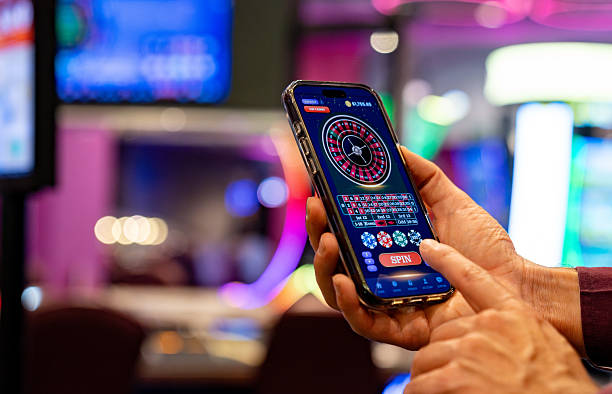
Our app keeps the casino lobby, live tables and betslip close without making you reload each screen. You can mark slot favourites, receive match and table alerts, use quick deposit from your account wallet, and unlock the app with fingerprint or face login on supported phones. The layout is built for one-hand browsing, so switching from a slot room to a live

dealer table feels fast.

  • Live tables
  • Slot favourites
  • Quick betslip
  • Fingerprint login
  • Push alerts
APP FEATURES

Phone features built into pecta

The app is not just a smaller website. We shaped it around phone habits: shorter menus, saved sessions, clearer alerts and a lobby preview that opens before you...

Fast login Keep your session ready with device-level security, then return through...
Dark mode Switch to a darker interface for evening sessions or low-light...
Push alerts Choose alerts for sports starts, live table openings, account updates...
Offline preview When your signal drops, the app can still show a...
Quick wallet Your wallet view is placed inside the account tab, so...
Saved favourites Pin the slots, tables and markets you open often. The...
pecta Install in three steps

Install in three steps

Installing takes a short phone flow. Android uses our APK file from pecta.net, while iOS gives you an install prompt from the browser. Keep your login details ready before you begin.

  • Download APK
  • Allow phone install
  • Open and sign in
DEVICE FIT

App compatibility for Pakistan phones

We test the pecta app on common Android and iOS devices used across Pakistan. Older phones may still open the lobby, but live streams and odds panels need stable memory and storage.

01

Android version

Android 8 or newer is preferred for smooth login, notifications and live lobby loading. Older builds may block security checks or background alerts.

02

iOS version

iOS 14 or newer gives a cleaner install prompt, stronger browser support and fewer issues with saved account sessions.

03

RAM

We suggest 3GB RAM or more for switching between live casino streams, slot rooms and sportsbook slips without repeated reloads.

04

Storage

Keep at least 250MB free for the app file, cache, updates and saved lobby images. More free space improves update handling.

05

Regions

Access is intended for supported regions of Pakistan where local law permits. Location checks may appear during account or wallet activity.

SCREEN TOUR

Inside the pecta mobile screens

The first screen opens on a trimmed lobby with live casino, slots and sportsbook paths separated clearly. Account tools stay in the lower bar, so you do not...

pecta mobile gaming
Live lobby preview
Quick bet
Account access
Slot favourites
Wallet tab
Support chat
APP SUPPORT

Help when the app stalls

If the app will not install, update or load a live stream, contact us from the phone you are using. Device model, OS version and a screenshot help us trace the issue faster.

Team online

App chat

Use in-app chat when you can reach the account screen. Our team can check session errors, failed updates and notification settings without asking you to repeat every step.

Email help

Email support with your phone model, Android or iOS version, and the time the issue appeared. Attach screenshots if the install button or lobby screen is stuck.

Install help

If Android blocks the APK or iOS does not show the install prompt, we will point you to the correct phone setting and confirm the pecta.net path.

APP SAFETY

How we protect app access

Your app session is tied to your account, your device and our security checks. We keep the download path clear, monitor unusual logins and give recovery options if your phone changes.

Signed file

Our Android APK is signed before release, so the phone can recognise the package during installation. Avoid renamed files or copies sent outside pecta.net.

No mirror stores

We do not ask you to install from random storefronts, file lockers or chat links. Start from pecta.net so the app source stays clear.

Recovery checks

When you change phones, account recovery may ask for extra verification. This protects your wallet, saved favourites and login history from unwanted access.

Session alerts

The app can alert you when a new login or security change happens. Keep notifications on if you want quick notice from your account.

Encrypted traffic

App traffic uses encrypted connections between your phone and our systems. Public Wi-Fi can still be unstable, so mobile data may load streams better.

Update control

We show update prompts inside the app when a newer build is needed. Updating helps keep login, lobby and notification features working together.

App feel against mobile browser

The mobile browser remains useful when you cannot install. The app gives a tighter return path, saved preferences and faster access to account tools on the same phone.

Login return
The app can remember a secure device session and bring back biometric unlock. A browser may ask for more repeated logins after clearing cookies.
Alerts
Push alerts work better from the installed app because they do not depend on an open browser tab. You can still control which alerts appear.
Lobby speed
Saved tiles and cached images help the app reopen familiar sections faster. A browser usually rebuilds more of the lobby after each fresh visit.
Screen layout
The app gives more room to slips, tables and account actions by removing browser bars. This matters on smaller Android phones.
Update prompts
Inside the app, we can show when a new build is required. Browser access changes quietly and may need a refresh to show updates.
Offline behaviour
The app can show a cached lobby preview during weak signal. The browser is more likely to show an error page until connection returns.
APP HIGHLIGHTS

Why keep pecta on your phone

Installing the app keeps your pecta account close without crowding the screen. It is built for short returns, quick checks and smoother switching between the areas you use...

One-hand lobby Primary tabs sit low on the screen, making it easier...
Match reminders Set alerts for selected sports markets, then return straight to...
Live table entry Table categories load in a cleaner mobile view with stream...
Slot shortcuts Keep favourite slot rooms near the front of the app...
Wallet visibility Your balance and recent account actions sit close to the...
Cleaner updates App updates are announced in the same place you use...

App questions from Pakistan

Yes. Android access uses the APK from pecta.net. Download it through your phone browser, allow the install when prompted, then open the app and sign in with your account details.

Yes, iOS access is available through the phone install flow from pecta.net. Open the site in your browser, follow the prompt, and keep the icon on your home screen.

Android shows that message for APK files installed from a browser. Allow the browser only for this pecta install, finish setup, then switch that permission off in settings.

Fingerprint or face login works on supported phones after your first successful sign-in. We may still ask for extra checks if your device, location or account activity changes.

The app may show cached lobby tiles during weak signal, but live streams, wallet actions and betslip updates need a stable connection. Try mobile data if public Wi-Fi is unstable.

When a newer build is needed, the app shows an update prompt. Follow it from pecta.net, install the new file, and keep your existing account details for login.

Restart the phone, check storage space, then reopen the app. If it still fails, send support your device model, OS version and a screenshot of the error.